Proxmox Backup Verification – Part 1
// Table of Contents
Disclaimer: This is an unofficial personal passion project, not an official Veeam product, and it isn’t supported or endorsed by Veeam in any way. I’m also not a professional developer, so treat this as a demonstration of the “art of the possible” rather than production-ready code, much of which was written with AI assistance. Use it with caution and test thoroughly in your own environment before relying on it for anything important.
Hello All and welcome back!
I have been using Veeam now for a number of years and one of my favourite features which is also probably the most hidden feature in Veeam is SureBackup, if you haven’t used it before, it’s a powerful backup verification tool that allows you to spin up a backup workload into an isolated testing environment and run automated testing across those workloads.
I have always considered SureBackup to be a brilliant piece of engineering that doesn’t get the love it deserves, especially in today’s age where backup verification is no longer optional.
These days my homelab runs on Proxmox, and with Veeam’s support for Proxmox ever expanding I have spent a lot more time playing with what we can achieve through the APIs, and honestly it’s been making leaps and bounds in terms of supportability, and with that, I decided to start a bit of a passion project, having a SureBackup-style experience in Proxmox like we have today with VMware in Veeam.
That is really all this is. A passion project to bring a SureBackup-style experience over to my Proxmox cluster, because I like the VMware version enough to miss it when it is not there.
This will be a three-part series running through the whys, explaining the tech behind the scenes and then jumping into a live demo, so with that, let’s get straight into it.
The Bit I Always Loved: Proof, Not a Green Tick
In today’s world just having a backup is not enough, as we always say in the industry “your backups are only as good as your ability to recover” because what good is a backup if you can’t recover them? And that’s the question SureBackup set out to answer, verification. How do I verify my backups in an automated fashion, because much like you, I don’t want to spend my weekends running verification tests to make sure it all works, I’d rather spend that time with my family building Lego.
Which brings me to what SureBackup does today, it creates an app group which essentially dictates the application set which could include a domain controller, SQL server, etc., whatever your app needs to run and then runs live automated tests to make sure all the services have started and that all the machines have booted in the right order, no need for you to worry if the app server came up before the front end, SureBackup takes care of all that for you in an isolated environment and then cleans up after itself once it’s verified it and then sends you a pretty report to tell you how awesome it’s been.
So that’s what I wanted to try to replicate in Proxmox. Automated, repeatable, on-demand proof that a Proxmox VM, or a whole application group, can be recovered from backup and will actually boot with zero risk to production.
How Much Veeam Already Hands You
The first nice surprise, once I actually started building, was how much of this Veeam already does for you.
The beta VBR REST API does a genuinely impressive amount of the heavy lifting for Proxmox already. Full backup job enumeration, restore point detection, filtering down to the VMs that are actually eligible, network metadata pulled straight out of the backup itself. It is all there, documented, and working. That is the hard part of any integration like this, and Veeam had it solved before I wrote a single line of code. For Proxmox support that is still this early in its life, that really impressed me, and it says a lot about where the whole thing is heading.
The only real gap was actually kicking off the restore, as the API doesn’t surface this today, but that’s not a big deal, as the functionality exists today in the UI, so this is handled manually currently, which is fair enough and I didn’t mind, as the rest is all handled programmatically via the API, and man, there have been many improvements, Veeam just going from strength to strength as always.
The Decision: Automate Everything Except One Click
I made the decision to try to automate as much as possible to try to replicate the functionality in SureBackup today and to try to make this as repeatable as possible, so this is what it actually does today.
At a high level, here is what exists and works right now against a real cluster:
- Builds a repeatable application group (a fixed set of VMs, boot order, and dependencies) from real Veeam backup inventory
- Automatically provisions fully isolated, production-mirrored networking for every recovery, and reuses it across runs rather than rebuilding it each time
- Boots the recovered VM(s) and proves it with a real console screenshot rather than an API success flag
- Gives you a reachable IP straight into the recovered VM, without it ever touching production traffic
- Writes a timestamped, shareable report for every run, screenshots and all, pass or fail
- Tears itself back down cleanly, either on your command or automatically after a timeout you set
A Quick Look at What Comes Out the Other End
Before I get into how any of this actually works, here is a taste of the payoff. This is what a finished verification run looks like.
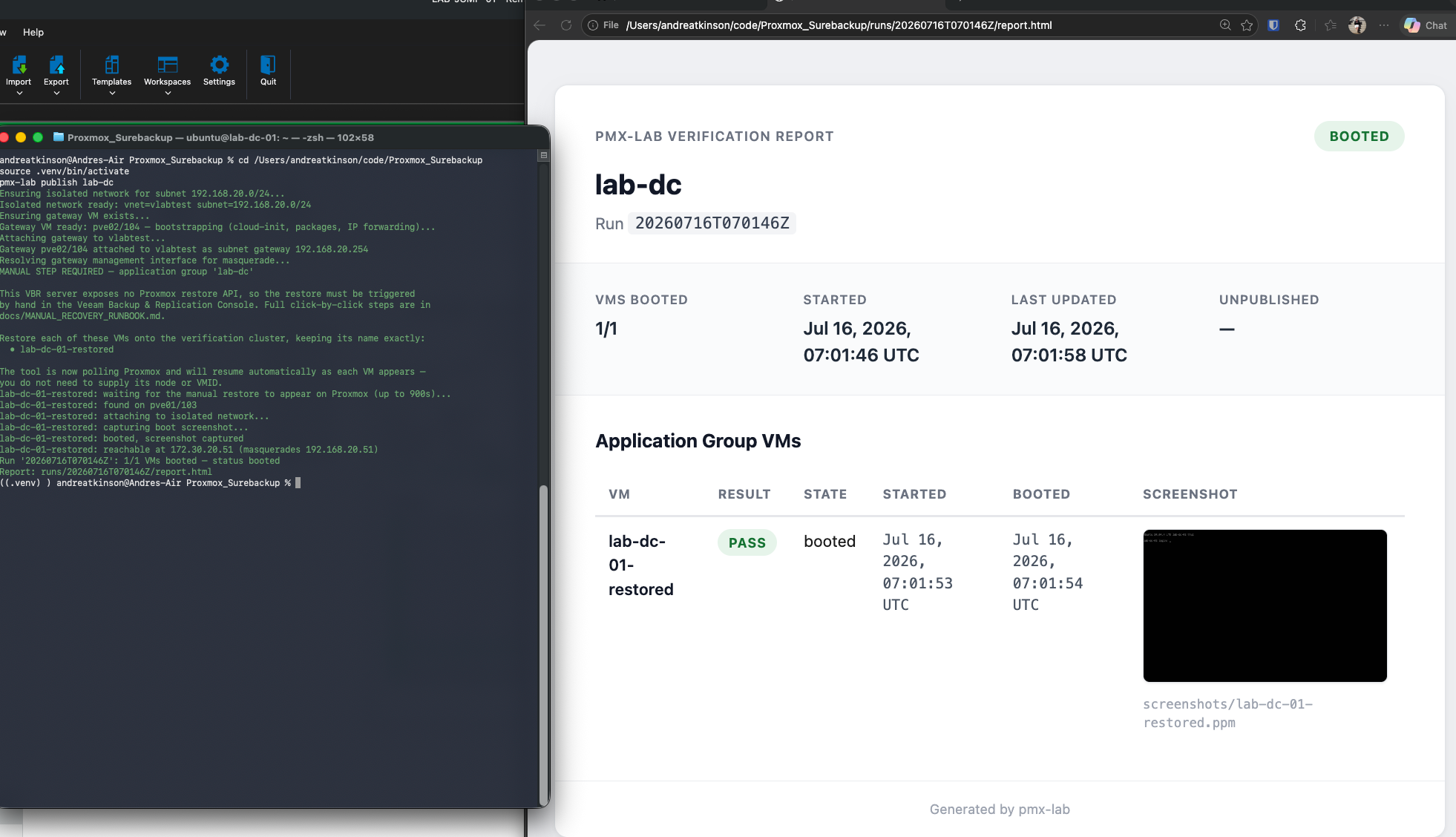
That is a real backup, recovered on-demand, proven to boot, with a report to show for it.
What’s Next
In Part 2, I will get into the actual mechanics: how the Proxmox API token is scoped down to least privilege, what had to be built on the Proxmox side to make the network isolation work, and a clear breakdown of exactly what is manual versus automated in this version.
Then in Part 3, I will run the whole thing live, start to finish, including that one manual restore step, with a video walking through the entire process.
Thanks for reading. Stay tuned for Part 2.