Advent Calendar Day 23: Role-Based Access Control (RBAC) in V13
Advent Calendar Day 23: Enhanced RBAC in Veeam v13
Welcome to Day 23 of our Veeam Blog Advent Calendar! We’re almost at the finish line. Today we’re exploring enhanced Role-Based Access Control (RBAC) in Veeam Backup & Replication v13.
V13 released a massive overhaul to how RBAC works, and honestly the team went pretty hard here and got really granular. If you’ve been using Veeam for a long time, you’ll know RBAC needed a bit of work, and boy did they deliver in V13! That’s why I’m highlighting this now because it could be so easily missed if you don’t go back and check the roles.
It’s almost Christmas, so grab whatever sweet treat and beverage you can reach, and let’s dive into RBAC!
Setup
The first thing we need to do is dive into the roles. We know Veeam comes with a few default roles and some new ones if you haven’t looked recently. However, we are going to create a new role to limit our user to only performing restores of certain workloads—just as an example to show how powerful this has become.
Creating a New Role
- Open the Veeam Backup and Replication Console
- Click the hamburger icon (It looks like a hamburger with the three lines ok :) )
- User and roles
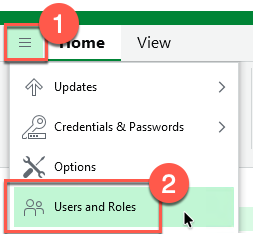
- User and roles
- Select the Roles Tab and click “Add”
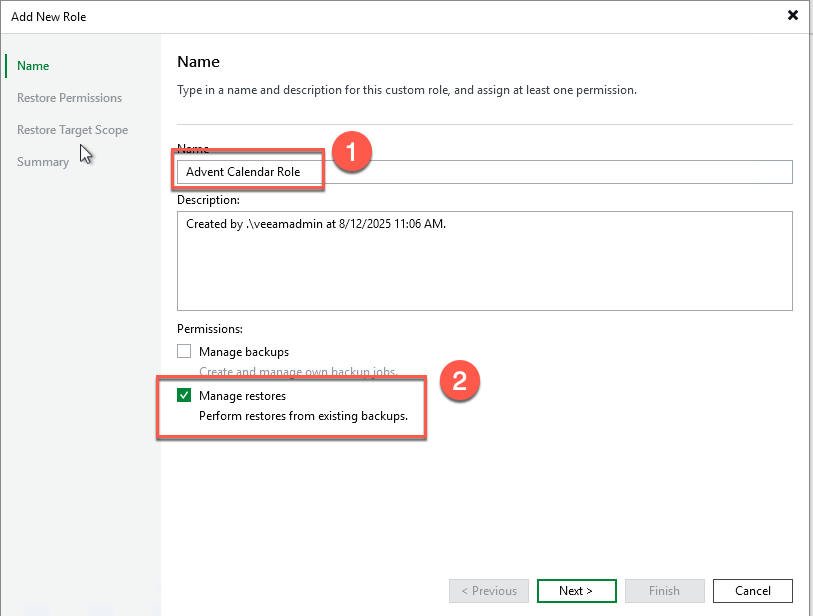
- Give your role a name and select the scope (in my case, “Manage Restores”)
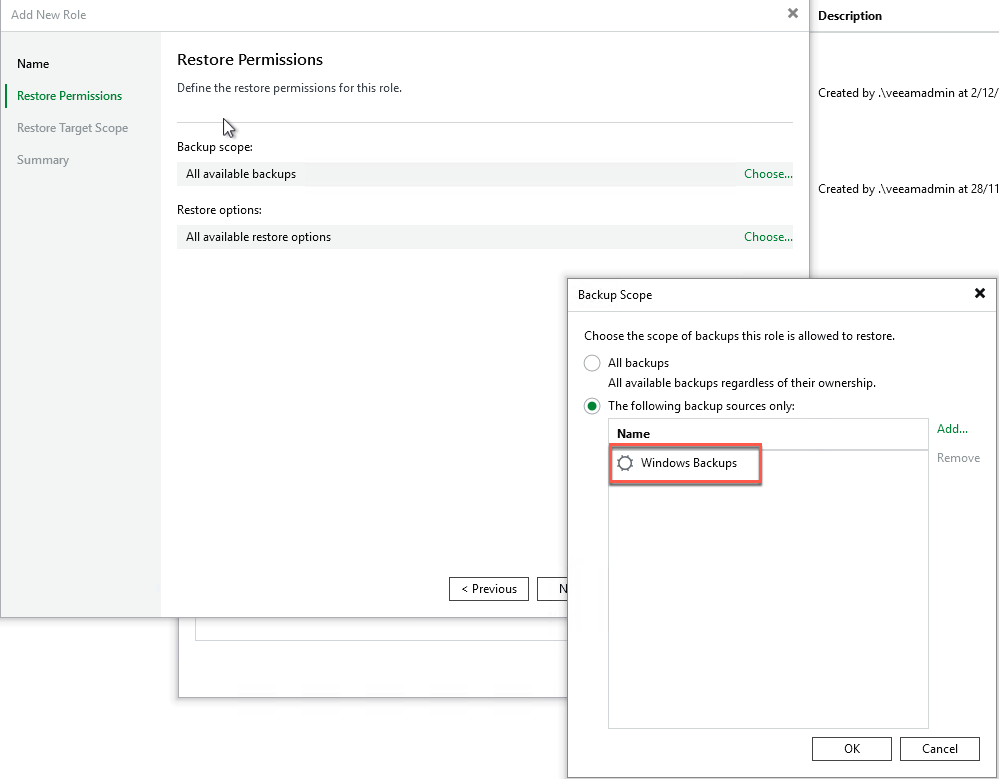
- Define the restore permissions
- This is where we can limit what someone can restore. In my case, I will limit this to just the workloads within the “Windows Backup Job.”
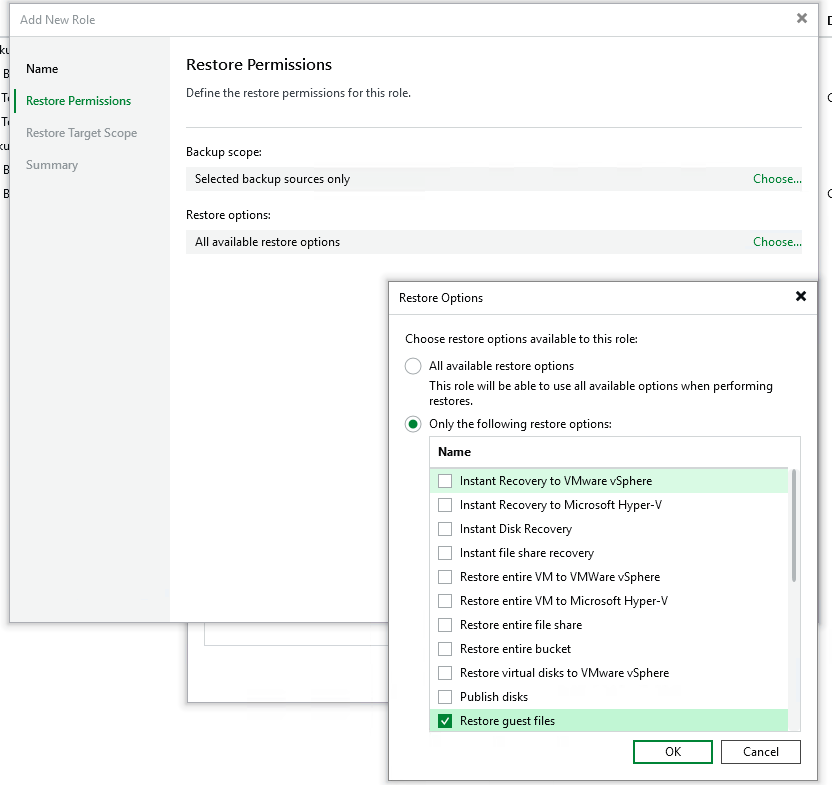
- I’ll also limit “WHAT” restore the user can perform. In my case, I’ll limit it down to restoring guest files only.
- This is where we can limit what someone can restore. In my case, I will limit this to just the workloads within the “Windows Backup Job.”
- Define the Restore Target Scope
- I’ll just leave this as default
- Summary and complete
- Click the hamburger icon (It looks like a hamburger with the three lines ok :) )
Assign Role
Now that we have successfully created our limited restore scope role, let’s assign it to our SAML user.
- Open the Veeam Backup and Replication Console
- Click the hamburger icon
- User and roles
- Select the “Security” tab
- Select the user in question and change their role to your newly created role
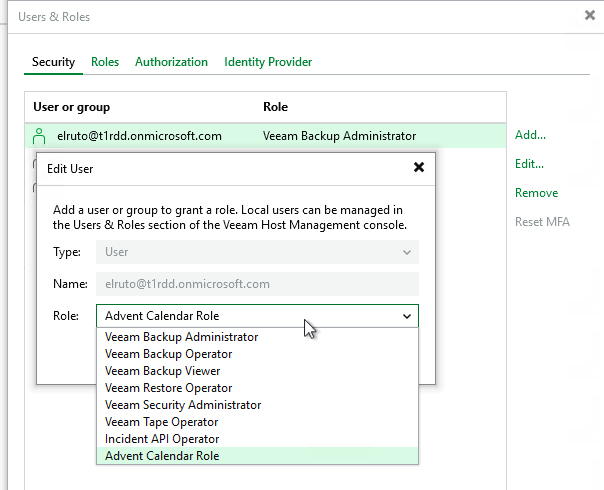
- Select the user in question and change their role to your newly created role
- Click the hamburger icon
Testing The Role
Now that the role has been created and assigned successfully, let’s test it.
When I log into the console, we can see that our SAML user has been restricted completely—not even able to see any backups. All additional options have been greyed out as well, leaving only the restore option available.
As a side-by-side comparison, you can see in the screenshot below we have our full admin account on the right and our SAML user on the left.
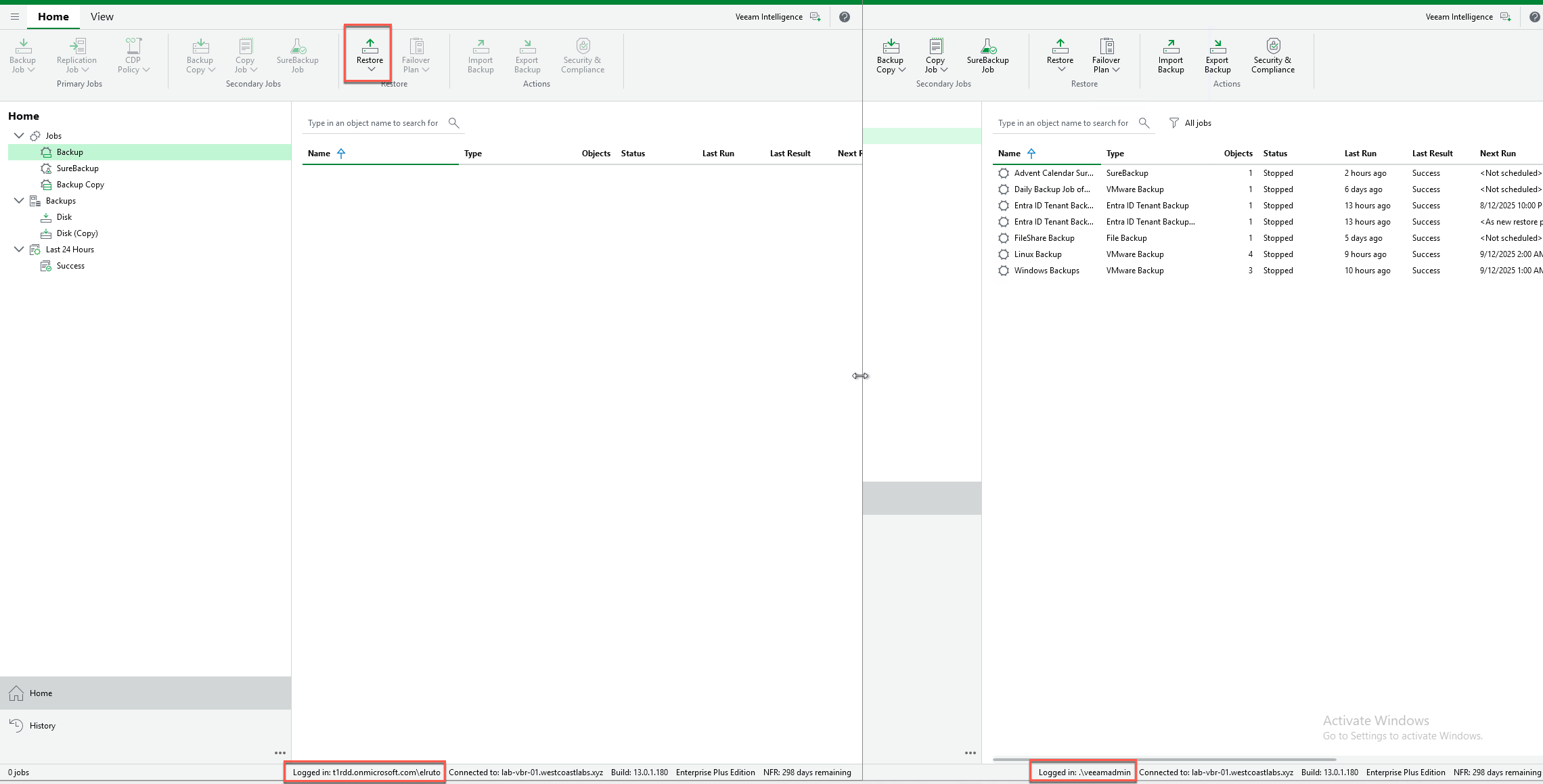
If we launch the restore wizard and follow the bouncing ball, we will see that all other restore options have been disabled. Whilst you can click through, it ultimately greys out and blocks you from moving any further.

The only option that works here is “Guest Files” because that’s all we have allowed, and because we limited it to only the “Windows” Backup job, that’s all I can see.
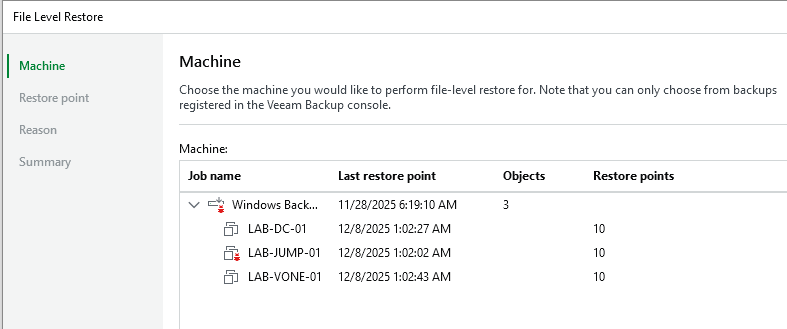
If I click through the file recovery wizard, we can see I have the option to select the restore point and successfully complete a single file restore.

Wrapping Up
And there you have it, RBAC in V13 is genuinely a game-changer. What we just demonstrated was a simple example, but think about the possibilities this opens up in your organization.
Remember back on Day 14 when we talked about SAML authentication with Entra ID? This is where it all comes together beautifully. Combine RBAC with SAML, and you have a powerful, centralized access control system that integrates seamlessly with your existing identity provider.
Think about someone in Service Desk needing to do restores but you dont want them making any backup changes or a DBA needing to restore just SQL but nothing else, what about an auditor that needs to look but you dont want them touching anything or even better what about the security team needing to publish a disk like on Day 19
The possibilites are now endless which is exactly why this made my hidden features list.
Veeam v13’s RBAC, combined with SAML authentication from Day 14, transforms access control from a manual, risky process into an automated, secure, enterprise-grade system. You get centralized identity management, granular permissions, automated provisioning, and a complete audit trail—all working together seamlessly.
Implement least privilege. Map roles to groups. Let your identity provider do the heavy lifting. Your security posture will improve, your teams will move faster, and your compliance auditors will actually smile (okay, maybe not smile, but they’ll be less grumpy).
Tomorrow is the final day of our advent calendar! See you for Day 24! 🎄
Security through control, efficiency through automation, confidence through auditing! 🎁