Advent Calendar Day 13: Distributed Metadata - Your Ultimate Insurance Policy
Advent Calendar Day 13: When Everything Goes Wrong, Metadata Saves the Day
Welcome to Day 13 of our Veeam Blog Advent Calendar! Today we’re diving into one of those features that really sets Veeam apart in my opinion and it’s how it handles its backup files: Distributed Metadata.
If we have ever had to rebuild a global dedupe catalog you’ll immediately know why this is insanely powerful, with Veeam we could literally lose the entire infrastructure, VBR server and all and still be able to recover as long as we have access to the repo and the encryption key, that’s the power of the distributed metadata and something that in my opinion is a great strength that is sometimes seen as a weakness and today I’ll prove why it’s such a strength.
Grab your coffee, because this one’s important!
What Is Distributed Metadata?
Let’s start with the basics. When Veeam backs up your VMs, it creates backup files on your repositories. But it also stores metadata about those backups in the Veeam configuration database.
Here’s the key difference with Veeam: distributed metadata isn’t a feature you enable, it’s a fundamental design choice built into how Veeam works. From the ground up, Veeam was architected to store critical metadata directly within the backup files themselves on the repository. This means the backup files are self-describing and self-contained.
Traditionally with other backup solutions, if you lost your backup server and its configuration database, you’d have a real problem. Sure, you have the backup files, but without the metadata you wouldn’t know what’s in them or how to restore from them efficiently.
The Disaster Scenario
Let me paint you a picture of the nightmare scenario that distributed metadata protects against:
It’s 3 AM. Your phone rings. Your data center has experienced a catastrophic failure. Fire, flood, ransomware, angry geese, pick your disaster. Your Veeam Backup & Replication server? Gone. The database? Toast. Your configuration backups? Also gone because they were on the same infrastructure.
But your backup repositories? They’re safe. They’re offsite, in the cloud, or otherwise protected.
Without distributed metadata: You’re in for days of pain. You’ll need to rebuild the server, try to reconstruct job configurations from documentation (you do have documentation, right?), and potentially run import operations hoping to get your backups recognized.
With distributed metadata: You install a fresh Veeam Backup & Replication server, rescan your repositories, and boom—all your backup chains are recognized, all restore points are available, and you can start recovering VMs immediately. No database restore needed. No complex reconstruction. Just point, click, restore.
That’s the power of distributed metadata.
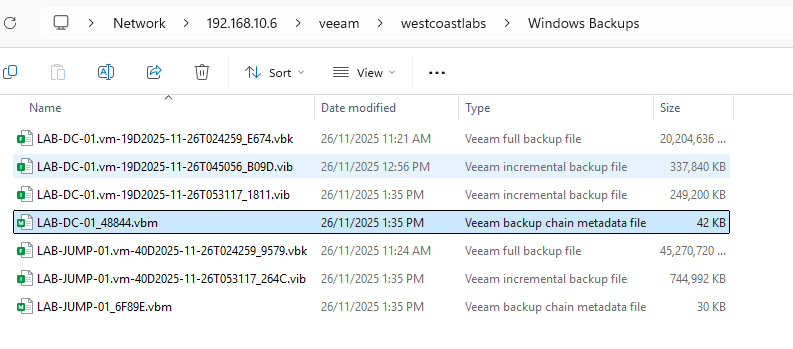
The Recovery Process
So disaster has struck. Here’s how you recover using distributed metadata:
Step 1: Install Fresh Veeam B&R
Stand up a new Veeam Backup & Replication server. It doesn’t need to be the same version (though staying close is recommended), and it doesn’t need the old configuration.
Step 2: Add Your Repositories
Add your existing repo to the newly created VBR server.
Step 3: Rescan
Perform a rescan of the repositories. This is where the magic happens. Veeam reads the distributed metadata and reconstructs:
- All backup chains
- All restore points
- VM configurations
- Encryption settings (you’ll need to provide the password)
Step 4: Restore
Start restoring VMs immediately. Full VM restores, file-level restores, application item restores—everything works because all the metadata needed is right there with the backups.
No need to rebuild the global deduplication database. No need to recreate job configurations. No need to track down configuration backups. Just scan and restore.
And just because I can, here is a Youtube of me deleting my VBR server.
Common Questions
Does distributed metadata slow down backups? The impact is negligible. There’s a small amount of additional I/O to write the metadata files, but it’s not noticeable in practice.
What if I lose my encryption password? Then you’re out of luck, unfortunately. Distributed metadata can’t help you bypass encryption. This is why securely storing encryption keys is critical.
Does this work with object storage repositories? Yes! This is especially useful for object storage in the cloud, where the repository might outlive your on-premises infrastructure.
Why I Love This Feature
Distributed metadata represents a fundamental shift in how we think about backup infrastructure. It moves us from “backups depend on the backup server” to “backups are independent artifacts that can be accessed from anywhere.”
It’s also representative of Veeam’s design philosophy: build resilience into every layer. Your backups shouldn’t just protect your workloads, they should protect themselves.
Looking Ahead
Tomorrow on Day 14, we’re going to explore another feature that makes your Veeam environment more resilient and easier to manage.
Wrapping Up
The beauty of distributed metadata is that you don’t need to remember to enable it, configure it, or maintain it—it’s just there, working in the background as a fundamental part of how Veeam operates. This architectural decision means every Veeam backup, by design, carries the information needed to recover it.
You might never need to leverage this capability, but if you do, you’ll be incredibly grateful that Veeam’s architects made this design choice from day one. And in the world of disaster recovery, that’s exactly what you want.
Think of it as insurance that’s automatically included. You hope you never need it, but when disaster strikes, you’ll be very glad you have it.
See you tomorrow for Day 14! 🎄
Stay curious, stay resilient, and as always, happy backing up! 🎁