Advent Calendar Day 12: VeeamZIP - The Unsung Hero of Quick Backups
Advent Calendar Day 12: VeeamZIP - Small Feature, Big Impact
Welcome to Day 12 of our Veeam Blog Advent Calendar! Today we’re kicking off the “fun stuff” portion of our advent journey, and I can’t think of a better feature to start with than VeeamZIP.
If you’ve never heard of VeeamZIP, you’re not alone. It’s one of those features that quietly sits in the Veeam Backup & Replication interface, not making a fuss, but absolutely saving the day when you need it. Let me tell you why this little feature deserves way more love than it gets.
As always go grab a coffee and let’s get cracking.
What Is VeeamZIP?
VeeamZIP is essentially a quick, one-off backup of a VM that creates a standalone full backup file. Think of it as the “emergency backup button” for when you need to quickly protect a VM before making changes, but don’t want to set up a full backup job or wait for the next scheduled backup to run.
The beauty of VeeamZIP is in its simplicity:
- Navigate to the Inventory tab
- Right-click a VM
- Select “VeeamZIP”
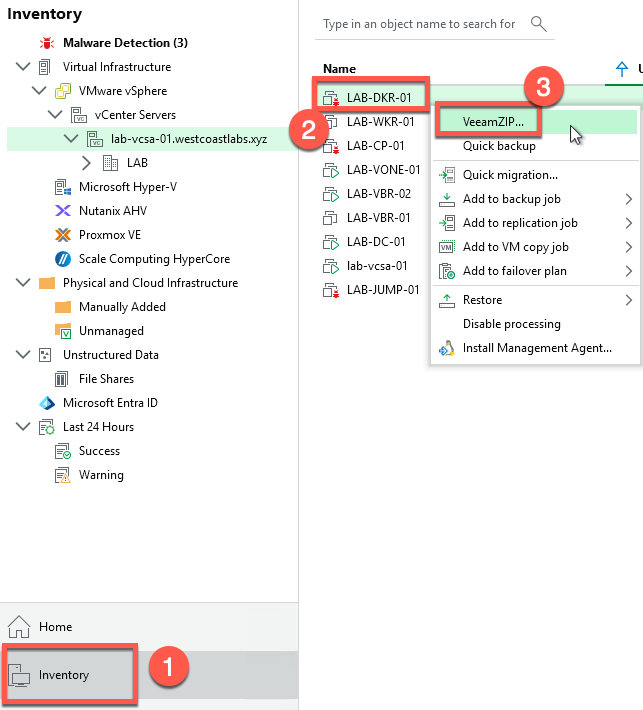
- Choose where to save it and apply the desired retention
- Done
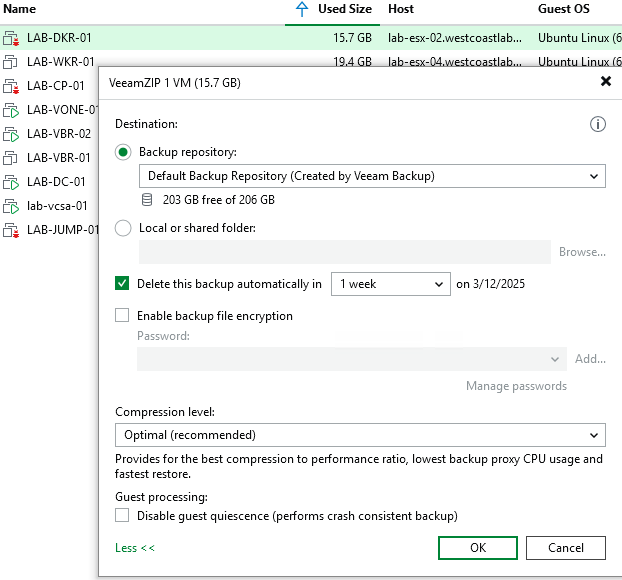
No job configuration needed. No scheduling. No fuss. Just a quick, full backup that you can restore from if things go sideways that is outside your usual job retention period so you’re not messing with your production backups.
When Should You Use VeeamZIP?
This is where VeeamZIP really shines. Here are some scenarios where I find myself reaching for it constantly:
1. Pre-Change Snapshots (But Better)
You know that moment when you’re about to install updates, make configuration changes, or test something potentially risky? Sure, you could take a VMware snapshot, but we all know the dangers of leaving those around. VeeamZIP gives you a proper backup that won’t impact VM performance and doesn’t come with the storage overhead and potential corruption issues of long-lived snapshots.
I can’t count the number of times I’ve thought “I should probably back this up first” before making changes (looking at you patch Tuesdays). VeeamZIP makes it so easy that there’s no excuse not to.
2. One-Off VM Protection
Got a test VM or temporary workload that doesn’t warrant a full backup job? VeeamZIP is perfect. You get the protection without cluttering up your backup infrastructure with single-use jobs.
3. Quick Archive Before Deletion
Planning to delete a VM but want to keep a copy “just in case”? VeeamZIP it to a repository or file share, and you’ve got a safety net without keeping the VM running and consuming resources.
This was probably my most used “use case” when I was a backup admin, we’d get a request from the infrastructure team to delete a VM and part of our change control we would need to take a final backup, simply just used VeeamZIP for it so I could get a standalone full backup of the workload once they powered it down, set the retention for a couple of months and just left it.
4. Development and Testing Baselines
As a developer or tester, you might want to capture a VM in a specific state that you can return to multiple times. VeeamZIP creates that perfect baseline snapshot that you can restore from whenever you need to reset your environment.
I’ve personally done this in my lab multiple times, even just writing these blogs I messed up my Docker host and I realized I hadn’t taken a snapshot but I did take a VeeamZIP and just used that to roll back rather than rebuild my Docker server, that poor server has been through so much in this blog series…
5. Migration Preparation
Before migrating VMs between hosts, clusters, or even data centers, a quick VeeamZIP gives you an insurance policy. If the migration goes wrong, you’ve got a recovery point that’s independent of the infrastructure you’re modifying.
The Hidden Power Features
Now, VeeamZIP might seem simple on the surface, but it’s got some tricks up its sleeve:
It’s a Real Backup
This isn’t just a copy or snapshot. VeeamZIP creates a proper VBK (Veeam Backup) file with all the features you’d expect:
- Application-aware processing
- Guest file system indexing (if you want it)
- Compression and deduplication
- Encryption support
It’s a first-class Veeam backup, just created on-demand instead of by a scheduled job.

Restore Options Galore
Because it’s a real backup file, you get all of Veeam’s restore options:
- Full VM restore
- Individual file restore with Veeam Explorer
- Instant VM Recovery
- VM disk restore
- Application item recovery (if app-aware processing was enabled)
PowerShell Automation
Here’s where it gets really fun. You can automate VeeamZIP via PowerShell! Need to create pre-change backups as part of a change management workflow? Script it!
# Prompt for credentials
$username = "veeamadmin"
$password = Read-Host -Prompt "Enter password for $username" -AsSecureString
$credentials = New-Object System.Management.Automation.PSCredential($username, $password)

# Connect to VBR server
Connect-VBRServer -Server "your-vbr-server" -Credential $credentials

# Perform VeeamZIP
$vm = Find-VBRViEntity -Name "LAB-DKR-01"
$rep = Get-VBRBackupRepository -Name "NFS Repo"
Start-VBRZip -BackupRepository $rep -Entity $vm -RetentionPeriodType Days -RetentionNumber 3 -RunAsync

# Disconnect from VBR server
Disconnect-VBRServer
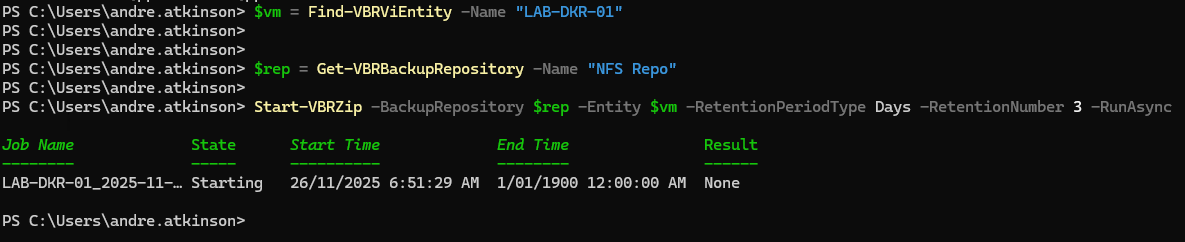
You could even integrate this into your patch management process, automatically creating a VeeamZIP before Windows updates are installed!
Flexible Storage Options
VeeamZIP doesn’t force you to use a backup repository. You can save the backup to:
- Any Veeam backup repository
- A local or network file share
- External storage
- Basically anywhere you can write a file
This flexibility is brilliant for scenarios where you want the backup close to hand or in a specific location for compliance reasons.
Wrapping Up
VeeamZIP might not be flashy, it might not be the first feature mentioned in marketing materials, but it’s incredibly useful. It’s the data protection equivalent of “measure twice, cut once.” Quick, easy, and potentially save-your-bacon levels of useful.
It also represents good Veeam design philosophy: powerful features that don’t require you to be an expert to use. The UI makes it accessible to anyone, but the PowerShell integration and advanced options are there for those who need them.
So next time you’re about to make changes to a VM and that little voice in your head says “maybe I should back this up first,” remember VeeamZIP. Right-click, backup, peace of mind.
Simple as that.
See you tomorrow for Day 13! 🎄
Stay curious, stay protected, and as always, happy backing up! 🎁