Advent Calendar Day 7: Utilizing Veeam Intelligence with VeeamONE
Advent Calendar Day 7: Integrating AI Intelligence with VeeamONE
Disclaimer:
I’m not a professional developer, and this content is intended to demonstrate the “art of the possible” rather than serve as production-ready guidance. Use these features with caution, and test thoroughly in your environment before relying on them for critical tasks.
Welcome to Day 7 of our Veeam Blog Advent Calendar! Over the last few days, we have spent a lot of time in automation, creating PowerShell scripts and N8N workflows and really seeing the power of automation. Today, I’d like to switch gears a little bit—still on the automation front—but rather than us writing our own code, let’s take a look at Veeam Intelligence.
Understanding AI in VeeamONE
VeeamONE has gained an immense amount of attention thanks to its new Veeam Intelligence capabilities, allowing us to talk to a secure Veeam-hosted Large Language Model to get insights into our Veeam Backup and Replication environment as well as anything connected to VeeamONE.
This really opens up the world of possibilities for us and what we can do and how we can start becoming smarter with our data. Whilst we could probably code this ourselves using N8N like we have done with AI agents, why not rather leverage the amazing work the devs have done?
Prerequisites
Before we begin, we of course need to make sure we have VeeamONE setup and VBR mapped (I’m spoiling the next blog here a bit :)).
Setup
The first thing we need to do is log into our VeeamONE server and enable advanced mode under Veeam Intelligence, and we can do that by:
- Clicking the Gear Icon
- Select Veeam Intelligence
- Select Advanced mode
- Select Veeam Intelligence
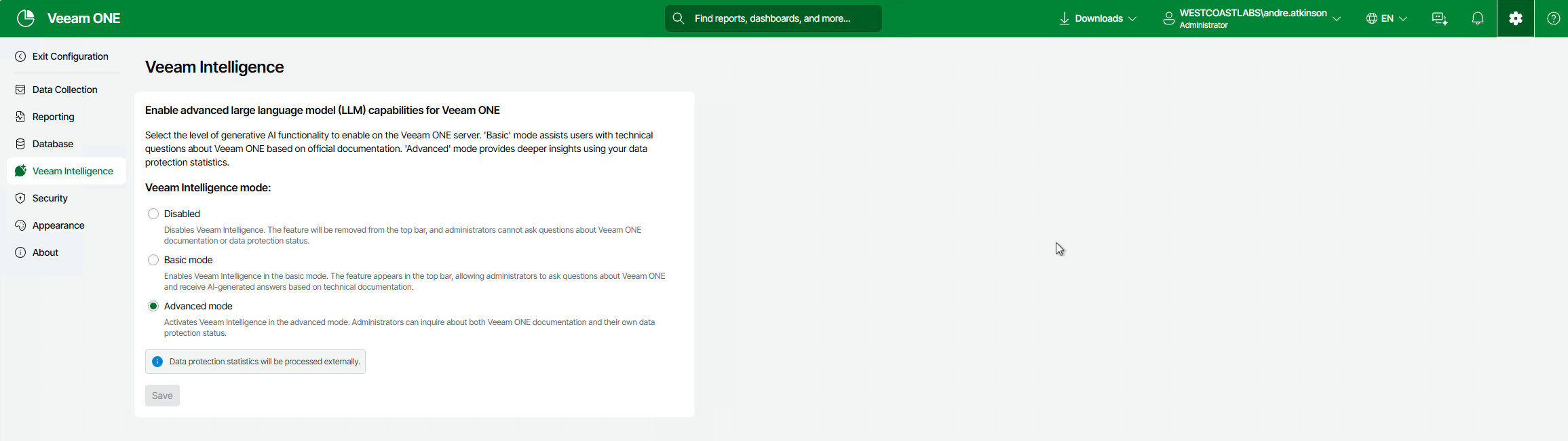
NOTE:
If you enable this option, data will be processed outside of your environment, so please make sure to follow the proper process for your organisation.
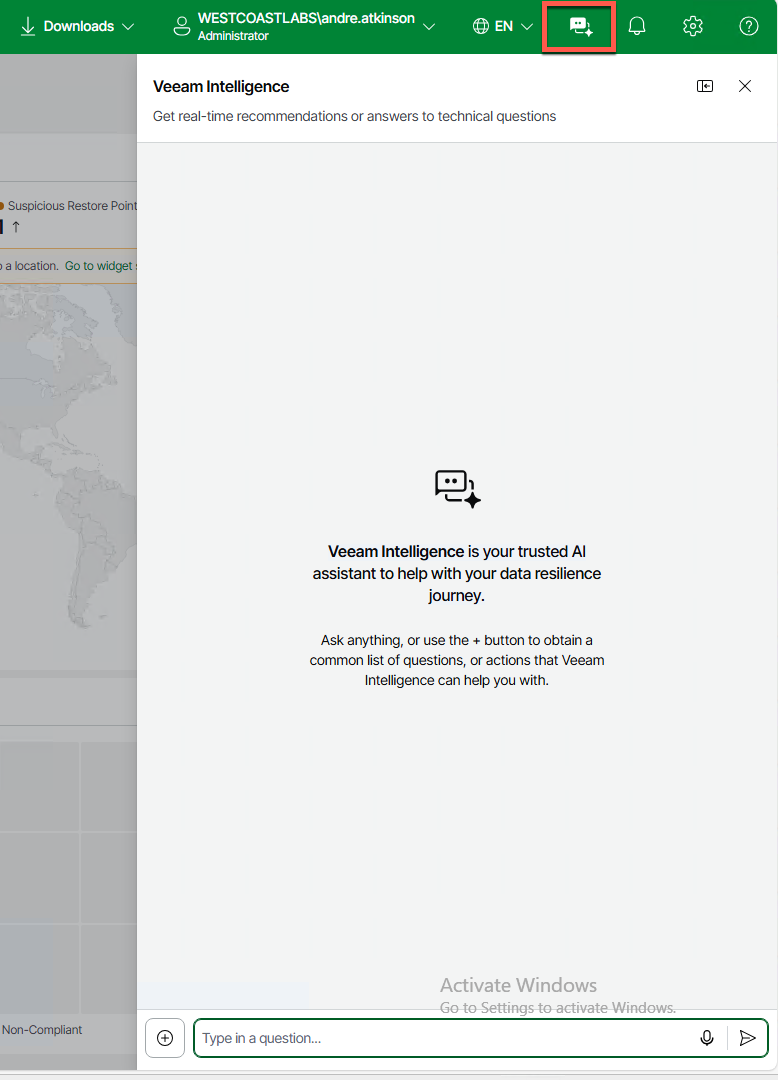
Once this is enabled, we can click on Veeam Intelligence and start asking it questions.
Crafting a Prompt
You’ll notice that there are a bunch of pre-created prompts you can use to start interacting with VeeamAI; however, it’s worth running through what makes a good prompt, as being more clear with the AI will allow us to get more value from it.
If we look at this prompt, which is one of the pre-created ones: “Give me an overview of my environment, based on the Threat Center score, with analysis across all widgets, and a summary, and recommendations of it at the end,” we can see a few things. The prompt gives a clear objective, structured request, and an actionable outcome, which in my opinion are the three main things to a prompt.
By keeping the prompt focused, it allows us to be very pointed with our requirements: go look at my environment and based on the threat center score, give me recommendations. Easy.
If I run that in my lab, we can see the following:

We can see that I have a pretty decent score, but there is some malware activity there. Let’s ask what repo that’s in:

As we can see, that’s been able to find and detect that workload that’s got some sort of malware activity within my Vault Repo. This is now actionable information I can provide to my security team.
Practical Use Cases
Now that we understand how to craft effective prompts, let’s explore some practical scenarios where Veeam Intelligence can dramatically improve your operations:
Compliance and Reporting
For those working in regulated industries, generating compliance reports can be time-consuming. Try prompts like:
“Show me all VMs that haven’t had a successful backup in the last 7 days, grouped by protection status, and provide recommendations for remediation.”
This not only identifies the problem but also provides actionable recommendations that you can immediately implement.
Security Posture Assessment
Building on our malware detection example earlier, you can go deeper:
“Review my Threat Center data and correlate any detected anomalies with recent restore operations. Highlight any suspicious patterns that might indicate ransomware activity.”
This type of query helps you connect dots that might not be immediately obvious when looking at individual data points.
Conclusion
Now that we have tried and tested a production-ready AI solution within Veeam, I’m sure it’s fair to say that we can truly see the power. But as always, it’s hopefully creating the sense of achievement and thinking outside the box—for example, how could we integrate AI into our N8N workflows? Maybe do some RAG-type activities and ask it questions against the VBR API? It’s really all about exploration and the art of the possible.
Veeam Intelligence has been an amazing addition to VeeamONE and something I truly hope everyone starts using daily.
As we continue down the mildly insane task of a blog advent calendar, I just wanted to pause for a second and say thank you for coming along. This really is a lot of effort and I enjoy writing these blogs, so thank you and onwards.
Tomorrow, we’ll be switching gears a bit away from automation and focusing more on security and how Veeam handles security before, during, and after a backup.
See you tomorrow for Day 8! 🎄